6 best reviewed desktop tech organisation and productivity gadgets

Here are six widely praised, easy‑to‑buy desktop gadgets that noticeably tidy up a desk, streamline workflows, or cut friction from day‑to‑day work. They’re all well‑reviewed by trusted outlets or have strong third‑party recommendations, and they solve common pain points—cluttered cables, cramped surfaces, poor lighting, or messy peripherals. Prices span budget to premium, so you can choose based on impact and desk real estate.
Best centralised docking power station

Why this is the single most transformative pick for most desks
Real, tested power for a modern laptop desk. WIRED’s 2025 roundup of top laptop docks calls Anker’s 568 one of the strongest options, noting it excels at powering all your other gadgets and supports serious charging and bandwidth.
WIRED - That praise comes from hands‑on testing and comparison across many docks—exactly what you want when you’re condensing messy cables and chargers into one tidy hub.
Serious port coverage without a giant block. USB4 up to 40 Gbps, laptop charging to 100W, multiple front‑facing USB‑C ports for fast device charging, plus a host of display and data ports—so you can connect monitors, wired Ethernet, storage, and peripherals from one unit, not a tangle of adapters.
Cleaner, calmer workspace. Instead of multiple wall chargers, a power strip, and random dongles strewn across the desk, you get a single, slim dock that sits neatly and internally routes everything. It’s a minimalist, durable piece that keeps the desktop footprint small while enabling a full desktop setup.
Tradeoffs
Premium price - It’s not cheap; that’s the price of serious capability and future‑proofing.
Windows‑leaning compatibility - Some USB4 docks can have limitations on specific Mac setups; check your system’s exact compatibility before buying, especially if you use macOS as your primary machine.
Best use case
Anyone using a modern laptop as a main workstation—especially with one or more external screens, wired networking, or multiple peripherals—who wants to eliminate cable clutter and speed daily connections.
Cable management organiser

Why this tiny gadget punches above its size
Immediate, no‑drill tidying for everyday cables - Magnetic clips keep charging or data cables exactly where you want, preventing them from sliding off the desk or tangling. It’s quick to install, easy to re‑stick, and works on many surfaces—perfect for a desk where you plug in phone, earbuds, or a tablet several times a day.
Strong editorial endorsement - The Strategist’s cable‑organizer guide picked Anker’s magnetic holder as the best magnetic option, noting a $15 price for a two‑pack and clearly recommending it after testing and vetting multiple systems.
New York Magazine - That kind of testing beyond ad copy gives confidence this is a legitimate, useful product rather than a gimmick.
Ultra‑low friction, ultra‑low cost - For a few dollars, you quickly transform a messy desk edge into a neat charging station—no heavy hardware or permanent changes needed.
Tradeoffs
Holding capacity is limited to small cables - It’s great for charging cords and small wires, not thick power cables or large bundles.
Adhesive eventually needs refreshing - Like most stick‑on organizers, adhesion can fade over time; re‑cleaning or re‑sticking is occasionally necessary.
Best use case
Any desktop where phone or accessory cables regularly fall off the edge, or where a minimal, tidy look matters more than hiding every cable in a box.
Best lighting upgrade to reduce glare and desk clutter
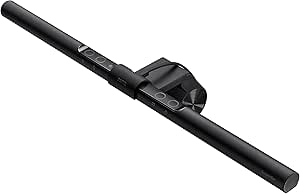
Why slotting this above your screen is so effective
Works where desk lamps can’t - It clamps on the monitor and shines downward onto the workspace, avoiding screen reflections. That means better lighting for documents, keyboard, or notes without wasting desk space—a perfect solution for tight setups.
Proven, long‑standing praise - PCWorld’s hands‑on review calls the ScreenBar brilliant for tiny desks or multi‑monitor setups, with the pros of USB power, space savings, and even brightness, though noting the higher cost.
PCWorld - The same review observed uniform light, effective glare avoidance, and strong practical use, not just a spec sheet.
Balanced features for real use - USB power, adjustable brightness and color temperature, and a clean, thin design mean it’s not just a novelty lamp; it’s a long‑term, everyday tool that makes working at night or in dim rooms easier.
Tradeoffs
Premium compared to basic desk lamps - You pay more than a simple lamp, but you gain space and less glare.
May block some webcams, depending on placement - Any monitor‑mounted bar can interact with a camera; consider your camera position, or use an external webcam mount if needed.
Best use case
Small desks, home offices in shared rooms, or anyone bothered by harsh shadows or screen glare who wants a clean, unobtrusive light.
Best premium space saver and ergonomics

Why it’s worth a premium for a truly clean desk
Clears the desktop and boosts posture - A monitor arm lifts the screen, freeing surface space for keyboard, notebooks, or a small organiser. Humanscale’s M2.1 is a professional‑grade arm with internal cable routing and a counterbalance system, designed for frequent adjustments and long life, so your desk stays neat without constant cable fuss.
Strong independent validation - PCWorld highlights Humanscale’s arm line for productivity, ease of adjustment, and built‑in cable management, noting the M2.1 supports better posture and a clutter‑free environment while offering quick, simple installation. staples.com That kind of third‑party recognition matters when choosing a high‑cost accessory you’ll live with daily.
Reliable build, fewer future headaches - Humanscale’s design emphasises durability, smart stops, and accessories; for a long‑term setup that you won’t want to replace, that’s valuable.
Tradeoffs
Price - It is expensive, even among professional arms.
Desk thickness or clamp limits - As with any clamp or grommet arm, verify your desk’s thickness or mounting method is compatible before buying.
Best use case
Small or medium desks where every inch counts, or anyone who wants a premium, long‑lasting arm to keep a tidy workspace and reduce neck or eye strain.
Best tidy stand with storage for small desks
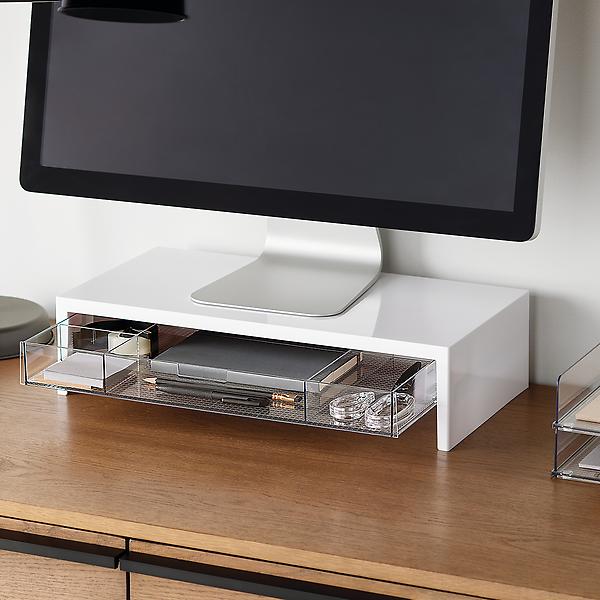
Why this is a great affordable add for cluttered desks
Raises the monitor and provides quick‑access storage - The stand lifts the screen to a more comfortable height while the drawer neatly holds small items—sticky notes, pens, USB sticks—so they don’t sit on the surface or get lost behind the keyboard. It’s exactly the sort of slice of organization that has a large visual impact for a modest spend.
Strong buyer feedback on the merchant page - It shows a 5‑star rating with real user reviews, indicating satisfaction and usefulness in everyday setups.
containerstore.com - That social proof is valuable for budget gear: people actually use it and like it.
Simple, universal design - Works with most monitors or laptops on desks that need just a bit more surface order, and it’s easy to move between rooms or desks.
Tradeoffs
Not a substitute for cable management - It frees space and adds storage, but doesn’t hide power strips or cables under the desk. Pair it with clips or a box if you have a lot of cords.
Limited size - It’s designed for modest setups; very large or heavy monitors may need a stronger stand or an arm instead.
Best use case
Students, small home offices, or anyone who wants an instant tidy look without drilling, wiring, or spending premium‑arm money.
Best low‑cost way to hide power strips and reduce visual clutter

Why a simple box can dramatically change how a desk feels
Hides the ugly stuff in seconds - Power strips, extra cords, and adapters get tucked out of sight inside the box, so the desk looks cleaner and safer. This is especially helpful for desks near outlets, or setups that rely on larger power bricks.
Third‑party recommendation from a respected guide - The Spruce’s cable‑management guide selects Chouky as a top box option, pointing to a $26 sale price and highlighting the usefulness of such boxes for organisation.
The Spruce - This kind of professional pick reinforces that Chouky is a vetted value choice, not just a random listing.
Much cheaper than pricey trays or racks, and easier to use - No drilling under the desk, no complicated installation—just place it where you want, route cords, close the lid, and you’ve instantly decluttered.
Tradeoffs
Limited access while in box - If you need to frequently unplug or swap connections, opening the box is needed; this is the normal tradeoff for a cleaner look.
Ventilation and heat - As with any box covering power gear, ensure adequate ventilation, especially in hot rooms; avoid cramming too many high‑heat devices without airflow.
Best use case
Tight apartments, multi‑use desks, or any workspace where power strips are visible and distracting, and you want an inexpensive, fast fix.
Additional guidance on picking among these
If you have one clean, modern laptop desk and multiple devices → start with the Anker 568 dock to dramatically reduce cables and centralise power. Add the ScreenBar if lighting is poor, or Cord Keeper if you still have a few stray cords on the desk edge.
If space is extremely tight or you use a heavy monitor → choose Humanscale M2.1 or another premium arm first to reclaim surface area. Pair with Chouky to hide power strips under or beside the desk.
If budget is tight but the desk looks messy → start with Cord Keeper and Chouky; add the Container Store stand for quick storage once money allows.
These six picks span budgets and specific pain points, but all are well‑reviewed or recommended by credible sources, making them safe, high‑impact buys for organising a desktop and boosting everyday productivity.
About the author
- Frontend Engineer | Building Accessible, Secure Travel Tech Solutions
Comments
Join the discussionNo comments yet. Be the first to comment.


